(the post is automatically translated by AI)
Introduction
The XY Pad is a common UI element in audio plugins — it lets you control two independent parameters at once. For example, you could set the X-axis to pan position and the Y-axis to volume level. Moving the thumb on the pad then simulates a sound source moving around the listener, which is a very intuitive control surface.
A basic XY Pad consists of two parts: a Pad (the canvas) and a Thumb (the draggable indicator). Here’s an example from Cabbage Audio Forum: the white area is the Pad, the green circle is the Thumb. The Thumb’s position maps to the X and Y parameter values.
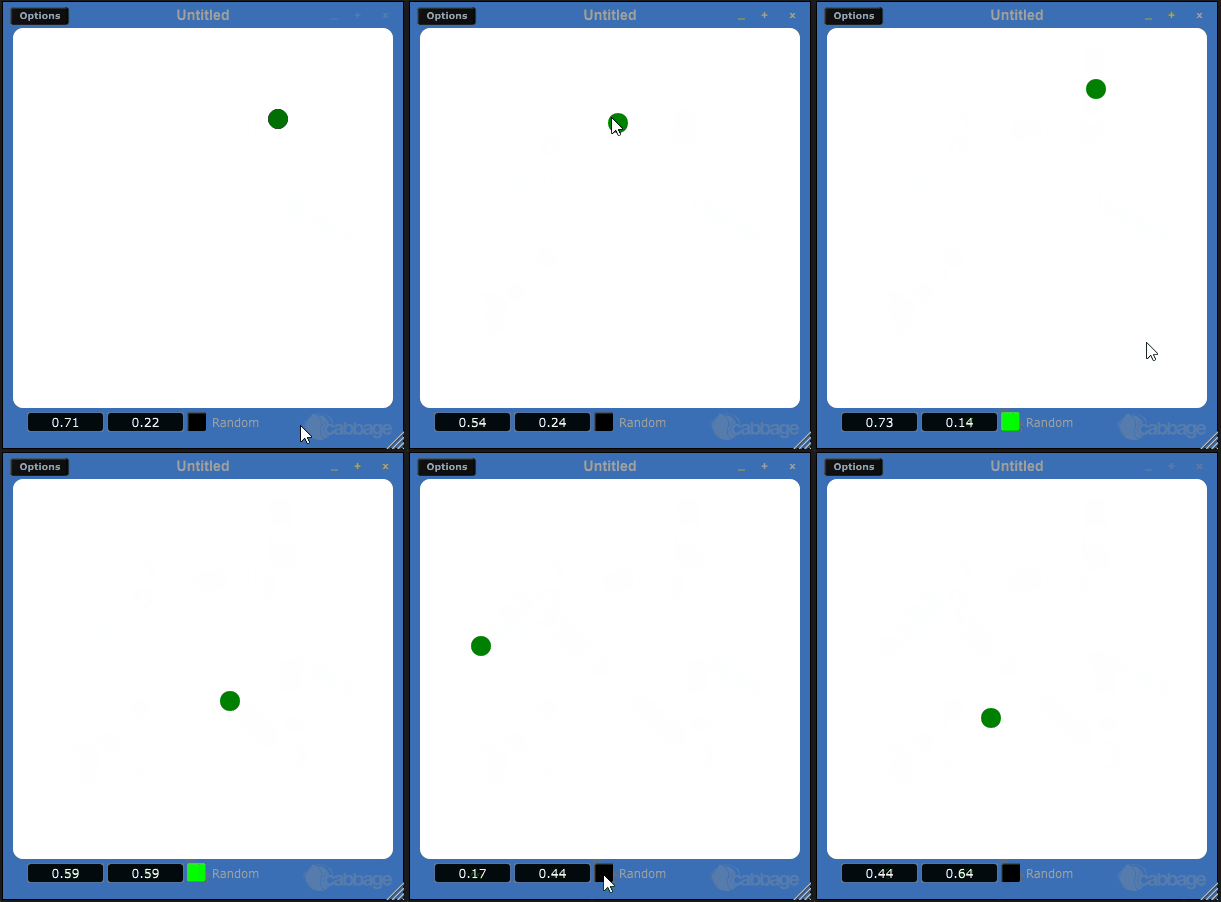
This article assumes you already have a basic understanding of JUCE and won’t repeat project setup in detail. For setup, refer to JUCE: Tutorial: Projucer Part 1.
Implementation
Project Setup
This is a brief overview. For a full guide on setting up a JUCE project, see a dedicated setup tutorial.
Open Projucer and create a Plug-In project (Projucer > Plug-In > Basic). Use the default settings or add modules as needed (e.g., juce_dsp). Click Create Project, then verify that File Explorer > Source contains four files: PluginProcessor.h, PluginProcessor.cpp, PluginEditor.h, PluginEditor.cpp.

Add the exporters for your platform (e.g., Xcode, Linux Makefile) under the left-side Exporters section.
ProcessorEditor
For this article, we only need to implement the XY Pad UI, so we focus on ProcessorEditor, which inherits from juce::AudioProcessorEditor (which itself inherits juce::Component). The two virtual methods to override are paint() and resized().

juce::Component::paint()
virtual void Component::paint(Graphics& g)
Every object inheriting Component can override paint() to define its own rendering. It’s called when the component needs to be redrawn — either via repaint(), or when the window is refreshed. Child paint() calls take priority over parent ones. To paint on top of children, implement paintOverChildren() instead.
Calling repaint() marks the component as “dirty” and schedules a deferred repaint on the message thread — meaning UI updates in JUCE are asynchronous, as in most modern UI frameworks.
juce::Component::resized()
virtual void Component::resized()
Called whenever the component’s size changes. Use it to position child components. Unlike repaint(), calling setBounds() or setSize() triggers resized() synchronously.
Building the Components
Pad
Create a class inheriting juce::Component and override paint() and resized():
class Pad: public juce::Component
{
public:
    Pad();
    ~Pad();

    void paint(juce::Graphics& g);
    void resized();
};
In paint(), draw a white rounded rectangle:
void Pad::paint(juce::Graphics& g)
{
    auto cornerSize = 10.0f;
    g.setColour(juce::Colours::white);
    g.fillRoundedRectangle(getLocalBounds().toFloat(), cornerSize);
}
Thumb
Create another class inheriting juce::Component. Override paint() for a circular shape, and also handle mouseDown and mouseDrag to move the Thumb. When dragging starts, invoke the moveCallback.
For
std::functioncallback usage, see the article How to Use std::function to Write a Callback Function
class Thumb: public juce::Component
{
public:
    Thumb();

    void paint(juce::Graphics& g) override;
    void mouseDown(const juce::MouseEvent& event) override;
    void mouseDrag(const juce::MouseEvent& event) override;
    int getSize();
    std::function<void(juce::Point<float>)> moveCallback;
private:
    static constexpr int thumbSize = 20;
    juce::ComponentDragger dragger;
    juce::ComponentBoundsConstrainer constrainer;
};
Constructor — configure the constrainer:
Thumb::Thumb()
{
    constrainer.setMinimumOnscreenAmounts(thumbSize, thumbSize, thumbSize, thumbSize);
}
Override paint():
void Thumb::paint(juce::Graphics& g)
{
    g.setColour(juce::Colours::green);
    g.fillEllipse(getLocalBounds().toFloat());
}
Override mouseDown() and mouseDrag():
void Thumb::mouseDown(const juce::MouseEvent& event)
{
    dragger.startDraggingComponent(this, event);
}

void Thumb::mouseDrag(const juce::MouseEvent& event)
{
    dragger.dragComponent(this, event, &constrainer);

    if (moveCallback)
        moveCallback(getPosition().toFloat());
}
Assembling the Components
The Pad contains the Thumb.
Add a Thumb member to Pad and make it visible in the constructor:
class Pad: public juce::Component
{
    ...
private:
    Thumb thumb;
    ...
};

void Pad::Pad()
{
    addAndMakeVisible(thumb);
}
Position the Thumb inside the Pad in resized():
void Pad::resized()
{
    juce::Rectangle<int> centre = getLocalBounds().withSizeKeepingCentre(thumb.getSize(), thumb.getSize());
    thumb.setBounds(centre);
    thumb.setCentrePosition(getLocalBounds().proportionOfWidth(0.5), getLocalBounds().proportionOfHeight(0.3));
}
(Optional) Define the Thumb’s move callback — e.g., to update a panner or volume value:
void Pad::Pad()
{
    ...
    thumb.moveCallback = [&](juce::Point<float> pos)
    {
        // do something with pos
    };
}
Add the Pad to PluginEditor:
class XYPadTutorialEditor : public juce::AudioProcessorEditor
{
public:
    XYPadTutorialEditor();
    ...
private:
    ...
    Pad pad;
}

void XYPadTutorialEditor::XYPadTutorialEditor()
{
    addAndMakeVisible(pad);
    ...
}

void XYPadTutorialEditor::resized()
{
    pad.setBounds(getLocalBounds().reduced(20));
}
Done!
That’s the XY Pad implemented in JUCE — fully draggable!
